Heyyy Bestie!👋🤗🩵
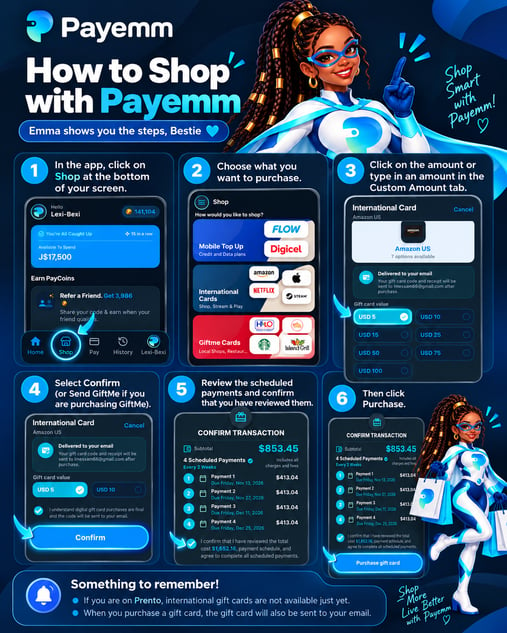
One of the best experiences with Payemm? Shopping!😁🎉So here are the steps to that amazing experience👇
-
Open the Payemm app and tap Shop at the bottom of your screen.
-
Choose what you'd like to purchase.
-
Select your preferred amount or enter your own amount under Custom Amount.
-
Tap Confirm (or Send GiftMe if you're purchasing a GiftMe gift card).
-
Review your scheduled payments and confirm that you've reviewed them.
-
Tap Purchase to complete your order! 🎉
💡 Something to Remember, Bestie!
- If you're on the Prento Plan, international gift cards aren't available just yet. You'll unlock them when you upgrade to FREEmium! 🌎
- When you purchase a gift card, it will also be sent to your registered email address. 📧
Happy shopping, Bestie! 🛍️🩵